
You should consider one of the available best 12-inch laptops out there if you’re looking for a good-quality mini computer these days, and we’ll discuss the available options in this detailed guide.
That’s especially the case if you’re after fast hardware, premium builds and modern features, as otherwise, if you’re on a tight budget, you’d be better off with one of the well-balanced 11-inchers which we cover in this separate article. That’s because there aren’t many affordable 12-inchers anymore, as most of the options in this class targeting a higher price tier, with a few exceptions.
With that in mind, we’ve split the devices we’re going to cover into two main sections, based on their type:
- convertible and hybrid 12-inchers with touchscreens;
- regular/classic clamshell 12-inch laptops;
- 12-inch business ultrabooks.
It’s also important to add that this is not just a superficial article like the many others you can find online. We’ve been reviewing compact laptops for more than 10 years now, both here on TLBHD.com and on Ultrabookreview.com, and we have hands-on experience with most of the devices mentioned here. I’ve also used a 12-inch laptop as my main driver for many years in the past, and while I have switched to the Dell XPS 13 in recent years, which is a compact 13-incher, I still think many 12-inchers provide that sweet balance between size, weight, and features you might look for in an ultraportable.
Best 2-in-1 12-inch mini laptops in 2025
Most 12-inch options pack touchscreens these days and are available in some sort of a convertible form factor. At the same time, you get to choose between two main formats: tablets with detachable keyboard folios, and 2-in-1 convertibles with 360-degree screens. The former are good for desk use and excellent as tablets, but not that practical on the lap, while the latter are great laptops, but not as practical in tablet mode, due to their increased thickness and weight.
As you’ll see down below, most options fall into the first category, with only a few 12-inch convertibles still available.
Microsoft Surface Pro – the all-rounder
Microsoft’s Surface Pro is still the go-to in this class, despite the fact that it started to show its age. The later iteration at the time of this update, the Surface Pro 7, is just an incremental improvement of its predecessors with updated hardware, better wireless, and finally, a long-awaited USB-C port. Microsoft’s newer Surface Pro X, on the other hand, is much slimmer, smaller, and overall a more modern design.
Even so, it’s impossible to fault this in terms of quality. Magnesium is used for the entire construction, and a 12.3-inch 3:2 high-resolution screen occupies the front face of this tablet, albeit with fairly large bezels by today’s standards. A pen can be bought as extra, for inking and drawing of this screen while for laptop use Microsoft offers a matching keyboard folio available in a few different colors, an excellent typer with illumination, and an Alcantara-like finishing.
Hardware-wise, the Surface Pro 7 is built on an Intel 10th gen platform with improved performance and graphics power over the previous generations. The base Core i3 models are fanless and perfectly quiet, while the higher-tier configurations require a fan to keep cool.
Performance-wise, all these variants will easily handle everyday tasks, with the i5/i7 variants able to tackle more demanding loads as well. Microsoft still offers the base model with just 4 GB of RAM, though, and I’d recommend staying away from it, that’s hardly enough even for daily use. Instead, go with an 8 GB configuration, or even one of the 16 GB variants if within your budget, as prices ramp up quickly once you spec this tablet up.
In fact, pricing is the major aspect that would keep most of you away from a Surface Pro. The base model starts at $799, but that’s without the keyboard folio or the pen, which go for an extra $200 combined. You’ll have to pay $999 for the i5/8GB variant with still very little storage, while a top-specced variant quickly goes to $2000 and beyond. Microsoft offers bundles and discounts on these MSRP prices, as well as various discounts for students/veterans, etc. , so you’ll want to take advantage of them if you’re into the Surface Pro.
Samsung Galaxy Book2 – best for creators
This is a very similar product to the Microsoft Surface Pro and primarily an option for graphics artists, creators and those who need good-quality pen-support on their Windows tablet. The Galaxy Book2 gets a Galaxy Pen that doesn’t require a battery and offers improved precision and lower latency than the Surface Pen, bringing the experience closer to the iPad Pro and its Apple pen. It also gets an awesome AMOLED high-resolution display, with excellent contrast and punchy colors.
Hardware-wise, this is available in two options, with either Intel Core or Qualcomm Snapdragon hardware. The Qualcomm option is especially interesting, although the Book2 is not as capable as a Windows computer in this variant, because it’s based on a Qualcomm processor. That means most apps will work fine, but you’ll run into compatibility issues and poor-performance with some older or specialized software. We’re not going to get in-depth here, just google “Windows 10 or Qualcomm problems” for more details.
On the other hand, there are specific benefits to having an ARM hardware platform inside: improved efficiency and battery life, always-on connectivity and included LTE, which are all missing from the Surface Pro.
Much like the Surface Pro, the Galaxy Book2 is not an affordable product by any means. It starts at $999 for the Qualcomm variant, with the Pen and keyboard folio included, but that’s still for just a 4 GB RAM /128 GB SSD configuration. The Intel variant, on the other hand, is listed at $1299 and up, but you’ll find both significantly discounted online. Follow this link for updated configurations and prices.
12-inch Chromebooks – simpler everyday notebooks
Chromebooks are a different breed of computer. They’re based on a simple and secure operating system called ChromeOS, and they’re excellent for browsing, video streaming, text-editing, email, and so on. In fact, they’re much snappier and easier to use than a Windows notebook with these daily chores, as you’ll find out from this guide that better explains what to expect from a Chromebook.
On the other hand, these are not meant to run the specialized software you get for Windows. They can run certain Windows/Linux apps, but with a sacrifice in performance and compatibility issues, so don’t get one of these if you need a computer for specific work/school applications that only work on Windows, or for playing games.
The bottom point, the average user that spends most of its time on the Internet will get an excellent value with these. There are many good Chromebooks out there, of various types and sizes, and we’ve gathered and compared them in this detailed article, while down below we’ve only listed those with a 12-inch touchscreen:
- Asus Chromebook C302CA – available for around $400 – a 12-inch convertible with an FHD IPS touchscreen, premium metallic build, and backlit keyboard. It’s a slightly older model and only available with 4 GB of RAM (which is Ok for a Chromebook, thanks to their lighter and better-optimized software), but still competitive these days and aggressively priced. Check out our full review for more details.
- Samsung Chromebook Plus – available for around $420 – another 12-inch convertible based on fanless Core M hardware, but with a 16:10 IPS display, non-backlit keyboard, and smaller 39 Wh battery. A fair alternative if the C302CA is not available in your region.
- Samsung Chromebook Pro – available for around $500 – still a 12-inch convertible, but with a slimmer and lighter construction and a nicer 3:2 screen with EMR support and a built-in pen.
- HP Chromebook 12 X360 – available for around $350 – an affordable alternative to the Samsung Plus, with a 3:2 HD+ touchscreen and convertible form-factor, backlit keyboard and 40Wh battery. It’s based on a lower-tier Pentium hardware platform, thus is not as snappy as the other options with multitasking, hence the lower price.
- Google Pixel Slate – available from $500 and up – a 12-inch tablet, similar to the Surface Pro or the Galaxy Book2. It’s a Google product with an excellently made magnesium shell, a high resolution 3:2 screen with EMR pen support, 47Wh battery and capable hardware. In fact, this is one of the few Chromebooks you can spec with up to 16 GB of RAM and 512 GB of SSD storage. The keyboard folio and pen are not included by default, and cost extra.
- Google Pixelbook – available from $900 and up – a 12-inch convertible, like the Asus C302CA or the Samsung Pro, but with a much nicer build, keyboard, and 3:2 high-resolution display. It can also be specced with the same RAM and storage options as the Pixel Slate, but it’s an expensive product for what it is, so not for everyone. I’d recommend this to power users and those who plan to run Windows/Linux apps alongside the regular ChromeOS capabilities.
Follow the links for more details on each product, user review, updated prices and the option to get one for yourselves.
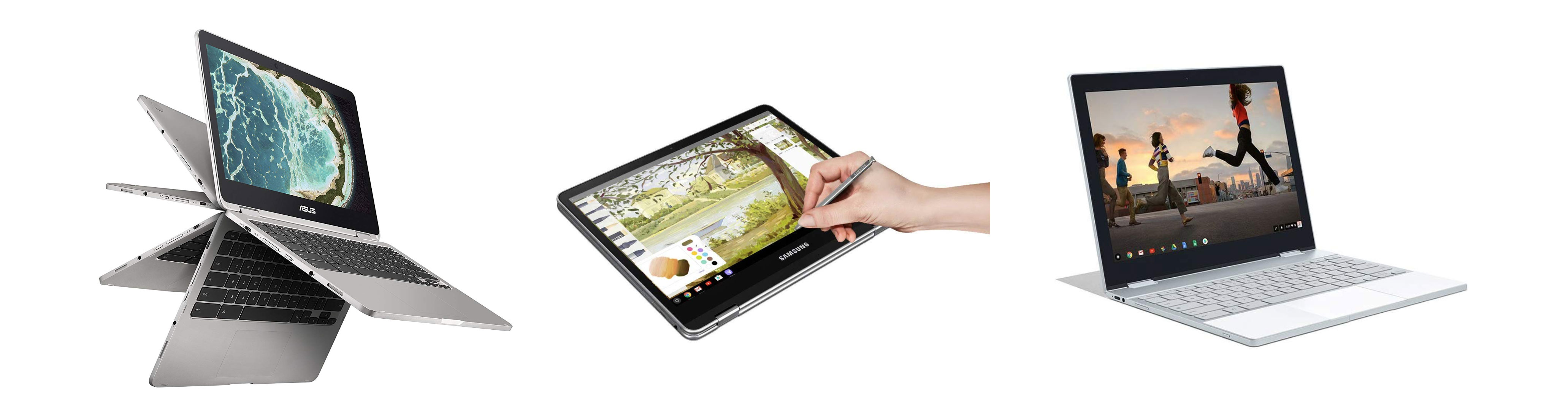
Some of the 12-inch Chromebooks above: Asus C302CA, Samsung Pro and Google Pixelbook
HP Envy X2, Elite X2 and Pro X2
HP offers a trio of 12-inch Windows tablets.
The Envy X2 is available in two variants: a Qualcomm-based product with long battery, LTE and always-on connectivity, just like the Samsung Galaxy Book2, as well as an Intel Core M powered version. You can find the former for around $500-$600 at this point, with the keyboard being included, which is not a bad deal for such a device, but keep in mind its capabilities are limited when compared to an Intel/AMD based Windows computer.
The Core M variant is available from $850, without the keyboard, so swims in waters where the Surface Pro is still king.
The Pro X2 is a business alternative of the Envy, available in more configurations and with extra security options. It gets a smaller screen with thicker bezels and a smaller battery, among others.
The Elite X2 is the newest addition to HP’s offer and the most compact and most powerful of the three. It’s based on higher-performance Intel Core U hardware with SSD storage and a 47 Wh battery, gets the same security options of the Pro X1, but it’s also very expensive, starting at around $1500 at the time of this update.
You’ll find more about all these on HP’s website or on Amazon.
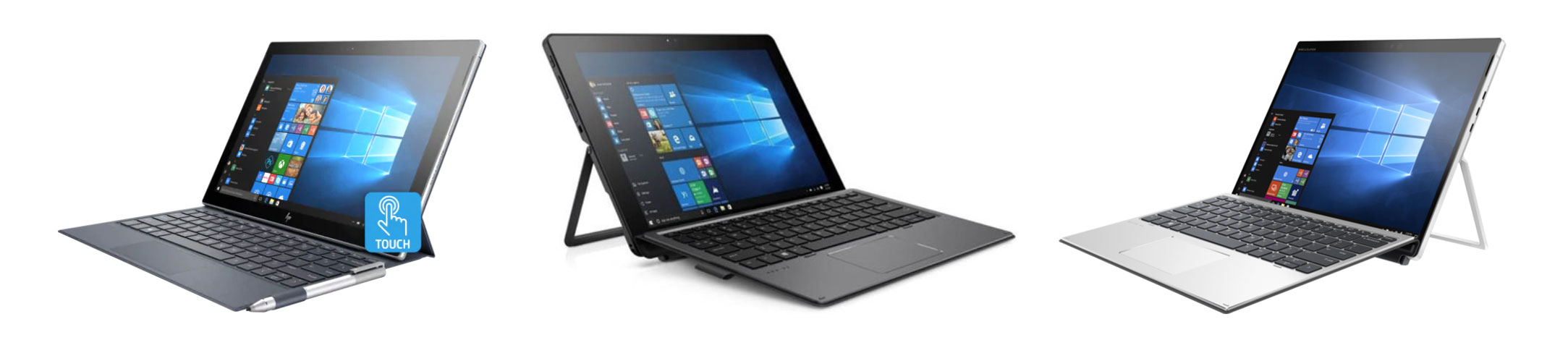
The HP X2 Windows tablets: Envy, Pro and Elite, from left to right
Dell Latitude 5000 and 7000 2-in-1
Dell offers two business tablets very similar to HP Elite above: the same 12.3″ 3:2 1920 x 1280 px displays, same business features, and the same hardware specs (Core U processors, up to 16 GB of RAM, SSD storage).
The difference between the two lines is minimal and hides in the details. The Latitude 5290 is available in a darker shade, gets a slightly flatter keyboard dock, a 42 Wh battery and is available with lower-tier specs, while the Latitude 7200 is more configurable and gets a smaller 28 Wh battery. You’ll find more about these two on Dell’s website or on Amazon.
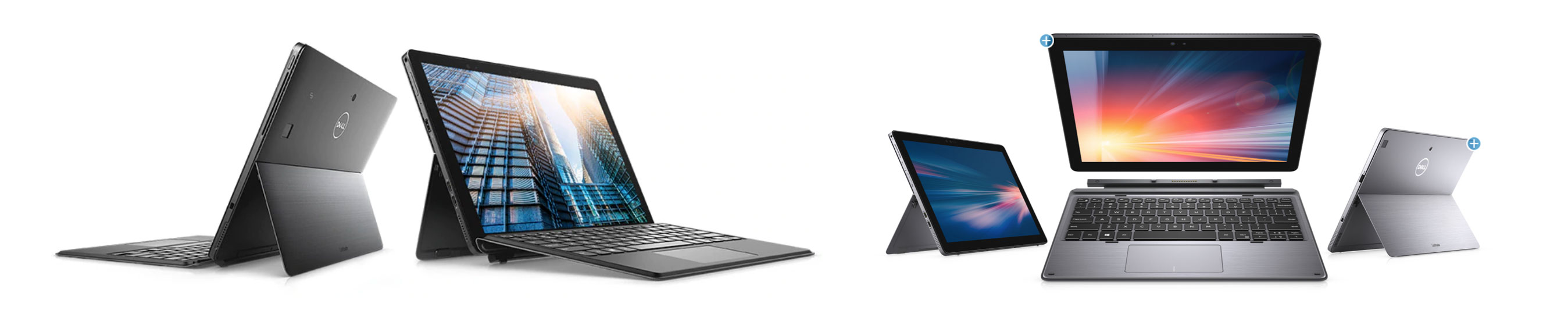
Dell’s Latitude 5000 and 7000 2in1s
The classics – clamshell 12-inch laptops
There are still a few simple, classic 12-inch notebooks left and we’ll talk about the best ones in this section. For what is worth, though, most OEMs go with 13-inch chassis these days for their best devices, and we’ve covered these options in a separate article on Ultrabookreview.com . For the most part, I’d recommend going with one of those instead, you’ll get better designs, improved performance and slightly larger screens in similarly sized packages.
Apple MacBook
The Apple MacBook is perhaps the only significantly different 12-inch notebook without a direct pier within 13-inch models, but it’s also an older product with distinct particularities that won’t cater to everyone.
That’s because this is a fairly expensive product primarily designed with portability in mind. It’s compact, thin and lightweight, it packs a nice screen and lasts for around 6-7 hours of daily use on a charge, but it’s only powerful enough for basic everyday tasks. Used lightly, it will do fine. Pushed, it will choke.
My main nits with MacBook are the keyboard and the IO, though. The keys are Apple’s Butterfly design, with short travel and known reliability issues. As for the ports, well, there’s only one, a USB TypeC connector on the left edge, used for charging the device, transferring data, outputting video and connecting peripherals, with the help of dongles and docks. None are included in the pack.
The base version of the MacBook 12, which includes a fanless Core M processor, 8 GB of RAM and a 256 GB SSD, sells for under $700 these days, if you can still find in stocks. That’s competitive for what this product is, just make sure it’s capable enough for your needs and you can live with its quirky particularities. Follow this link for more details and potential discounts.
12-inch business ultraportables: Lenovo ThinkPad X280, Dell Latitude 12 5000/7000
Both Lenovo and Dell have recently moved towards the 13-inch segment with their prime business ultrabooks, but you can still find the 12-inch models in stores.
These have a few things in common: 12.5″ displays, competitive Core U hardware with good amounts of RAM/Storage, business features, proper IO, nice keyboards and fairly compact, sturdy and light shells, at around 2.6 – 2.8 lbs. Keep in mind you’ll actually find both smaller and lighter options with larger screens these days, many under 2.2 lbs / 1 kilo.
It’s also important to note that unlike the 12-inch hybrids that get 16:10 or 3:2 displays, these laptops only get 16:9 screens with rather mediocre IPS panels. That means midling contrast, brightness and colors, and even poor resolution. Lenovo at least offers an FHD touch panel for the X280, but Dell only offers HD matte IPS screens on the Latitude 5290 and 7290.
On top of that, none of these is available with the latest Intel 10th gen hardware, and won’t get further updated since the move to those 13-inch models aforementioned (Thinkpad X390 and Latitude 7300).
These aspect do translate in competitive pricing, though. If you can accept the lower resolution screens, the 12-inch Latitudes are excellently built, excellent typers, solid performers and last for a long while on a charge, thanks to their big batteries: 68 Wh on the Latitude 5290 and 60 Wh on the Latitude 7290. The ThinkPad X280 doesn’t trail very far behind either with its 48 Wh battery, and gets the more competitive screen option and pricing.
Follow these links for updates on configurations, availability, and prices at the time you’re reading this article: Dell Latitude 12 5000, Dell Latitude 12 7000 and Lenovo ThinkPad X280.

!2 Inch Business Laptops: Dell latitude 5000 and 7000, Lenovo ThinkPad X280
Wrap-up
That’s about it with my list of recommended 12-inch laptops.
These days there aren’t as many laptops in this class, especially in the affordable sub-800 dollars price category. Most manufacturers migrated their cheap entries towards the smaller 11.6-inch class, and kept the 12-inchers as their more premium options, with high-end features and powerful hardware specs which don’t come cheap.
Thus, if you’re looking for more affordable mini laptops, you should also check out at my detailed list of recommended 11.6-inchers. And if you’re just after a compact and portable laptop and don’t mind something with a 13/14-inch screen, go through this list of the best ultrabooks you can buy these days.
As for this post, I’m going to constantly update it each couple of weeks, so be sure to check it out periodically. Also, feel free to post your opinions, remarks, and questions in the comments section below, I’m around to reply and help out if I can.





Drathale
April 1, 2011 at 1:11 pm
ASUS 1215 T is a very good affordable 12 inch laptop- stating from my own use.
It certainly deserves a review.
Mike
April 1, 2011 at 3:20 pm
Didn’t have the chance to ever get my hands on this one so there’s nothing I can say about it 🙁
Gaby
April 1, 2011 at 1:55 pm
Hi Mike!!
I think you are doing and amazing job, by using all your knolewdge and experience to help us 😀 Congratulations about that!
I would like to make you a quick question, i want to buy a netbook and i want it to fast: wich one of this would you recommend me? HP DM1-3090 or ASUS 1215B? or another one that you consider that is about that price, but always with AMD.
Thank you so much 😉 and congrats again!
Mike
April 1, 2011 at 3:19 pm
Gaby, both of them are very good so I would go for the one you like best and can find cheaper
Varun Thakkar
April 7, 2011 at 4:01 pm
Hey Mike, I heard that the real model 1215B is deprived of a LAN port. Is it true?
Mike
April 12, 2011 at 1:41 pm
Not from what i know
Andre
May 7, 2011 at 5:52 am
I am wondering if there are portable laptops/netbooks with internal optical (DVD drive) available other than sky-highly priced Vaio entries.
And on another topic entirely, which is the largest (maybe around 12-13 inch) AND lightest portable laptop/netbook available? Which, among them, comes with dedicated graphics?
Thanks for your kind response.
Mike
May 7, 2011 at 8:09 am
Andre, you’ll hardly find any 12 incher with DVD unit these days and also anything with dedicated graphics (except for the 1215N – sort of – and the Dell Alienware M11X) . You’ll have to go to 13.3 or even 14.1 devices to find these for an affordable price
Fh
June 14, 2011 at 10:51 am
Hi Mike. Opposite to your recommendation above in your 1215B review you say it tops the N. Which is the better choice? Thanks
Mike
June 15, 2011 at 9:38 am
yea, i should fix that. Like I said in the review , the 1215N is theoretically slightly faster on paper, but in practice the 1215B performed better, because of the graphic bottlenecks of the Atom + ION architecture. I will write a post that will explain the differences between these two pretty soon, but if you guys have any more questions, just leave a comment or contact me by email
Nicmazza87
September 20, 2011 at 1:02 pm
hi, love your reviews
i am looking for the right netbook. i will use it manly to browse, writing and watching movies on a hd tv. I was going to buy an ul20ft but i read on many reviews that a 1215b is better suited for watching movies because of its discrete graphics, what do you think?
Another question: which model of the 1215b has the 1.66 cpu and which one has the 1.0 one? i live in italy, in case its something country-based
thanks
Mike
September 22, 2011 at 1:49 pm
e AMD The 1215B can play 1080P movies smoothly, while the UL20Ft cannot.
Also, on the 1215B, i would ge tthe version with the AMD E350 APU clocked at 1.66 Ghz. The version with the AMD C-50 APU is clocked at 1.0 GHz and also has poorer graphics, as this processor is developed for smaller 10 inch devices.
Andre
September 27, 2011 at 5:21 am
Man that U260 design is sooooo funky! Love it! But what’s with battery life (only 4 hrs)? It isn’t like it sports a discrete graphics there…
The Series 4 is rather nice also, although not as drool-inducing as Series 9.
What about the rumored orange, new and faster Lambo VX6? Is there any new news?
Which one in 11.1-12.5 inch range that comes (or soon comes!) with great graphics?
But for now, I’d just stick to Asus UL20FT. Best one all around.
Thanks and kudos!
Mike
September 27, 2011 at 9:00 am
No word on the new VX6X but I do know Asus is working on new 12 inchers, including the UX21 and some others. So stay tuned
Bruno Dantas
March 8, 2012 at 3:25 pm
Any word about the Asus 1225 series?
Mike
March 12, 2012 at 12:22 am
The new Asus 1225 laptops are actually 11.6 inchers now, and you can read my reviews of the two in the dedicated section (see the menu on top of this page)
Vivek Kumar
May 22, 2012 at 5:44 pm
Dear
Can you review or give comments regarding HP Pro book 4230s? Whatever I have seen on HP website seems to be impressive. Although about 1 year old now, I feel that is also a good alternative to all these mentioned above.
Tina
May 31, 2012 at 9:23 pm
I am looking for mini laptop
My brother has recommended me Asus
My desire that it s comfortable to carry and I think I just use it for playing game or entertain but not net book ^__^
Could you recommend me anything else?
Thank you for future ^__*
Andrei Girbea
June 1, 2012 at 2:08 pm
TIne, the post above is upo to date and thois are my recommendation. You can also see my post on the Top 11.6 inch mini laptops, you can find it on the front page of this website.
gaurav
July 6, 2012 at 6:49 pm
hii mike…i want to buy samsung series 3 mini laptop 12.5 inch..But i am little scared as i heard i3 processor not go well with small screen..is it true?
also Amd processor i headr they got heating problem too
Andrei Girbea
July 10, 2012 at 1:56 pm
I wouldn’t say that. I don’t get what you are trying to say with the Core I3s not going well with Small screens, but these processors are fast and will work fine on any of these small laptops or bigger ones.
As for AMD APUs, I didn’t encountered overheating problems when using them
natalia
January 15, 2013 at 8:32 am
Hi Mike, I would like to buy a 12 inch laptop, my budget is $550. I spotted this Dell Inspiron 14z and the HP Folio 13-1029wm. Which one is better? Please advice me.
HJay
April 6, 2014 at 11:28 pm
“I’ve been using a 12 inch laptop as my main daily driver”……. I thought drivers sat behind the wheel of a car..? In what way is a 12 inch laptop a driver?
Speak the Queen’s English, there’s a good chap!
Alkasel
July 6, 2014 at 12:30 pm
Hi!
I would link to buy a pc for handwriting.
Therefore, I’d like to know if these pc have resistive or capacitive touchscreen. Or is ips a type of touchscreen different from the previous? and if it’s the case, is ips touchscreen good for handwriting, as much as resistive touchscreen?
Lastly, when you say “the battery last for about x hours of everyday use” what do you mean with “every day use”? using pc with wi-fi on, medium brightness etc?
thank you very much
Vlad
August 21, 2015 at 4:30 pm
Running a 12.5″ HP Elitebook 2570p with an upgraded CPU (i7-3740QM instead of i5-3360M), upgraded storage (256GB SSD + 2TB HDD in optical caddy), upgraded RAM (incoming 16GB 2133 CL11 RAM), and the option of external GPU through ExpressCard.
Food for thought.
jaff
July 3, 2016 at 2:19 am
Hi Mike… I am a programmer, and a part time unit trust consultant.. I am torn between gettting a thinkpad yoga 260 vs yoga 900s.. The thinkpad is due to good keyboard while the 900s is due to screen and weight factor.. The laptop would primarily use for the unit trust works.. Interested in getting your opinion on which would you choose..if you’re in my situation…
confuse
January 5, 2017 at 10:27 am
hi there,
too many product in the market nowadays and it making us consumer prove to making a wrong choice. i really need an upgraded for my HP Pavilion 360x 11-u019tu. i used in for office tasks, surfing internet & watching movies etc.
i need a suggestion on latest product below 12 inch laptop/2 in 2s/ultrabook which had enthernet port like my hp. i dont wanna carry around ethernet doogle and lost it when i need it the most.
although it is a little bulky but HP 11 inch 360x grow on me due to the fact it has a lot of ports & easy to carry around.
Muhammad Hassan
January 8, 2017 at 6:40 pm
what about razer blade stealth
Amman Khan
September 19, 2021 at 1:12 pm
I feel like the new Microsoft Surface laptop Go is a solid and budget clamshell laptop, as long as you don't get the base model.